Refresh pages that already rank with the content refresh workflow in SEO Content Machine. SCM uses Search Console data to pick the pages, then rewrites them from web research.
Why use this?
- A page that ranks near the top but gets few clicks is cheaper to improve than a new page is to rank.
- The agent picks those pages from your own Search Console data, so you do not guess.
- The rewrite comes from research. The ‘Topic Refresh’ template reads your live page and the top search results before it writes.
- SCM updates the existing WordPress post. It does not add a copy.
Requires a site with Google Search Console access and a WordPress site to publish to.
Notes
- This workflow is for a site with pages that already show in Google.
- An AI model that writes from memory alone gives you stale facts. This is why the refresh template researches the web first.
- To refresh 1 page by hand without Search Console data, see Refresh any live page in SEO Workspace.
Import Search Console data
- Click ‘New SEO Workspace’ and pick ‘Search wins’.
- Pick your site and click ‘Get data’.
Your pages come in with their impressions and clicks.
Let the agent pick the pages
- Click ‘Review results with AI’. The agent finds pages that rank near the top.
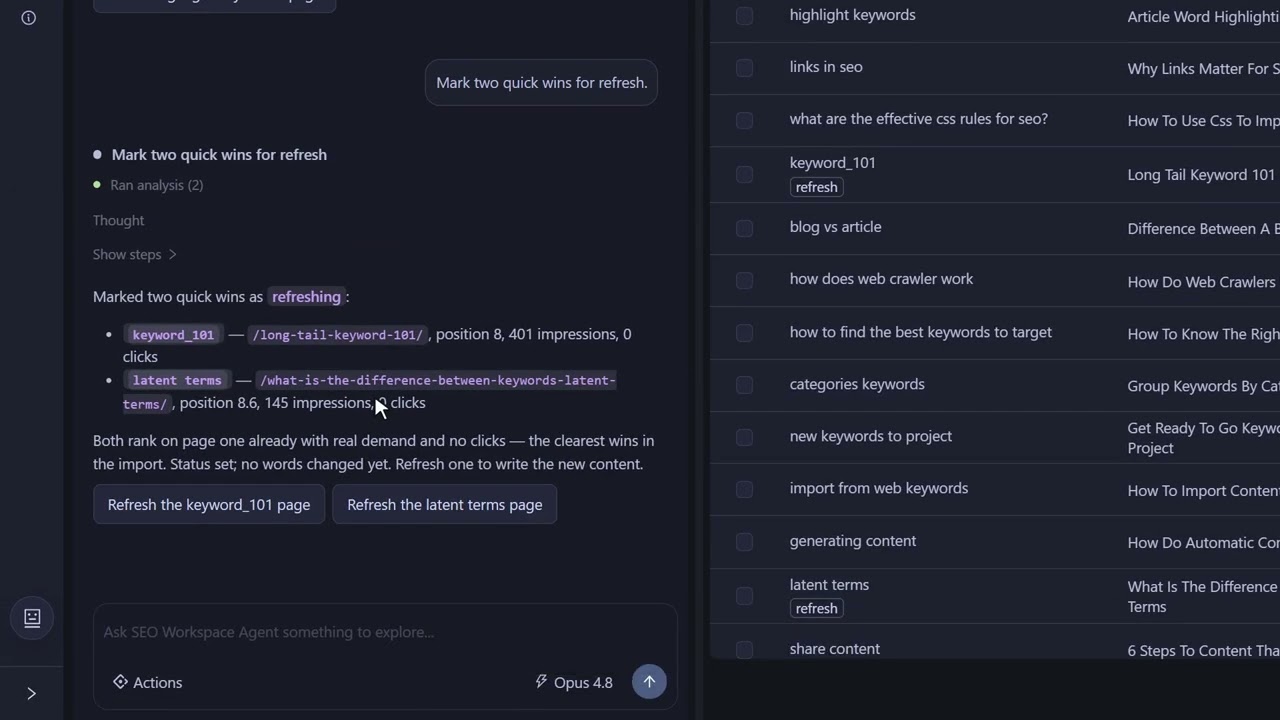
- Ask it to mark 2 of those pages for refresh.
- Read the chat. It confirms what changed and why, so you can check its reasoning before anything is written.
Write the refresh
- Open the ‘Pages’ tab and click the ‘refreshing’ filter to find the picked pages.
- Tick the page you want written and click ‘Create pages’.
- Click ‘Review settings’ if you want to see the page inputs that go to the AI.
- Click ‘Create’. SCM writes the draft in the background.
The page already has the ‘Topic Refresh’ template assigned. This template tells the AI to research the web before it writes, and it feeds in the content of your current live page as the text to rewrite.
Try the refresh workflow in the free 14-day trial
Review it and publish to WordPress
- Wait for the page to move to ‘refresh draft’, then click the ‘refresh draft’ filter.
- Click the page icon to view the rewrite.
- Read it against your old page, edit it and check the facts.
- Click ‘Publish’ and pick your WordPress site.
SCM updates the old post, and the row moves to ‘refreshed’. Come back in a few weeks and check how the page moved in Search Console.
FAQ
Which pages should I refresh first?
Pages that rank near the top but get few clicks. The agent finds them in your Search Console data.
How is this different from asking an AI to rewrite my page?
The ‘Topic Refresh’ template reads your live page and the top search results before it writes. An AI model on its own writes from memory.
Will SCM create a duplicate post on my blog?
No. SCM updates the existing WordPress post.
Does a refresh guarantee a better ranking?
No. SCM does not guarantee rankings. Check the page in Search Console a few weeks after you publish.
Can I refresh a page without Search Console data?
Yes. See Refresh any live page in SEO Workspace.
What does it cost to try?
The trial is free for 14 days and includes 100,000 AI credits. Prices are in What is SEO Content Machine (SCM) and what does it cost.