Turn client notes into an SEO content plan and brief in SEO Content Machine. Give the agent your rough notes about the client, and SCM builds the brief, the research and the first pages.
Why use this?
- The slow part of a new client is everything before the pages: the brief, the research and the plan.
- Rough notes are enough. 3 lines get you a brief with business, site, market and competitors filled in.
- The agent picks the first pages to fit the goals in the brief and tells you why.
- You get a handoff document written for the client, ready to send or to drop into a proposal.
Requires a WordPress site to publish to.
Notes
- This workflow is for agencies that bring on a new client.
- Each workspace is 1 client site, so every client gets their own brief, plan and history.
- SCM only writes a page when you tell it to.
Start from your client notes
- On the SEO Workspace screen click ‘New SEO Workspace’.
- Pick ‘Client brief’. It is the starting point built for agencies.
- The agent asks for your notes. Paste in what you have. Rough is fine, and 3 lines are enough to get going.
The agent turns those notes into a brief.
Check the brief
Open the ‘Brief’ tab. Business, site, market and competitors all come from your notes. Read it and fix anything that is wrong, because the agent plans every page from this brief.
Research the market
- Go back to chat. The niche box is already filled in from the brief.
- Click ‘Find opportunities’. SCM finds what people search for in this market.
- Wait a few minutes. When research is done, the table is full of page ideas.
Plan the first pages
- Ask the agent to plan the first pages. It picks pages that fit the goals in the brief.
- Read the chat. It says which pages to start with and why.
- Open the ‘Site plan’ tab to see the client site as a tree. Home is on the left and each box is 1 hub with its pages.
The rows the agent picked now say planned. Each one has a template, an intent and a funnel stage, and the agent set all 3.
Try the Client brief workflow in the free 14-day trial
Write a page
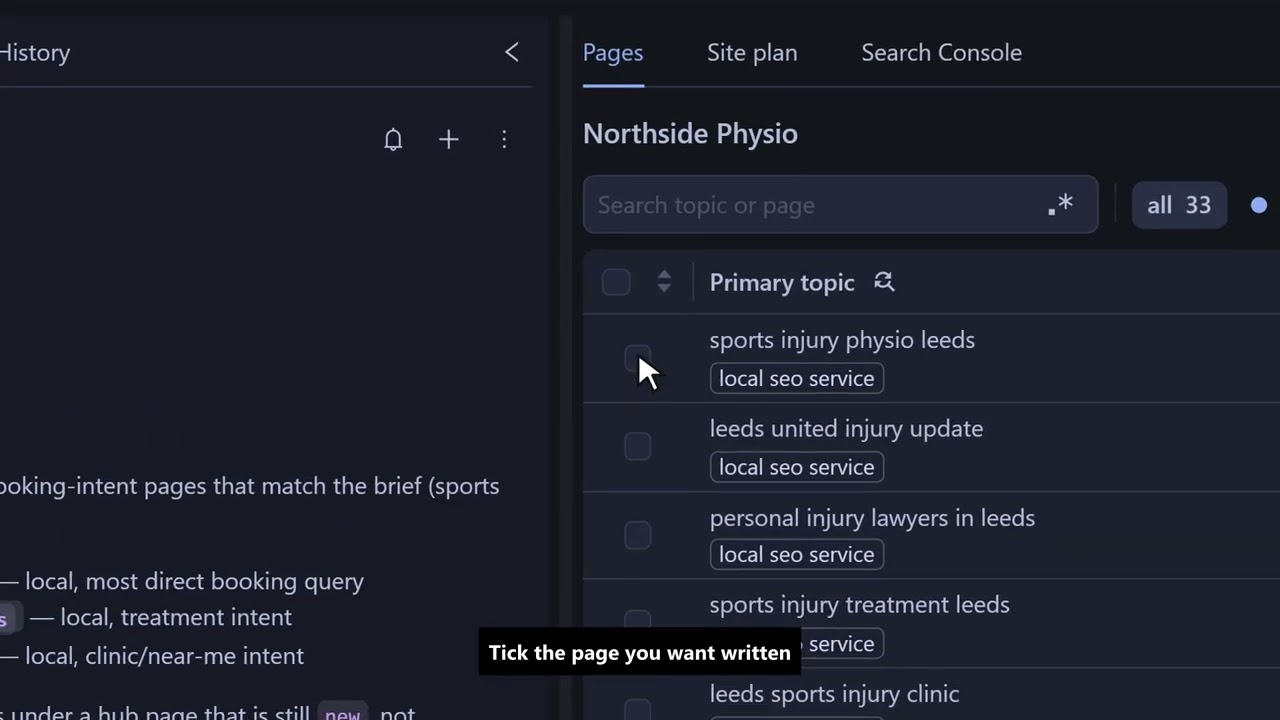
- Tick the page you want written and click ‘Create pages’.
- The dialog shows what SCM will write. ‘Review settings’ lets you change any of it.
- Click ‘Create’. SCM writes the draft in the background, so you can keep working.
Get the client handoff doc
This is the part your client sees.
- In chat, ask for the handoff doc.
- The agent writes the client plan from the brief and the site plan.
- Open the document it saved. It is a file, so you do not copy it out of the chat.
The plan is written for the client. Send it to them, or drop it into your proposal.
Review the draft and publish to WordPress
- Back on the ‘Pages’ tab, click the ‘draft’ filter.
- Click the page icon to view the draft. This is the full page, written to the brief.
- Edit the text right there.
- Click ‘Publish’ and pick the client’s WordPress site.
FAQ
How much do I need to write about the client?
3 rough lines are enough to get a first brief. You fix the details in the ‘Brief’ tab.
Do I need a separate workspace for each client?
Yes. Each workspace is 1 client site, with its own brief, site plan and history.
What does the client get?
A handoff document with the content plan, written for the client. Send it as it is or drop it into your proposal.
Does SCM write or publish pages on its own?
No. SCM writes a page when you click ‘Create’ and publishes it when you click ‘Publish’.
Which AI writes the drafts?
You choose. Use SCM AI credits, your own AI keys or a local model.
What does it cost to try?
The trial is free for 14 days and includes 100,000 AI credits. Prices are in What is SEO Content Machine (SCM) and what does it cost.