Agent Pages: one keyword in, real local research out

What we’re seeing

Google doesn’t like local seo pages that read the same. Ie a local page that is the same as all other pages on your city, just with the city name replaced,

Local pages rank when they include facts that are only true of that locality.

More of content generation by LLM has to be actually useful, the days of relying purely on LLM memory for hallucinated article writes are numbered.

Why the old model breaks

SCM started with basic keyword > single prompt > AI article,

Then it was single prompt > write section > combine to make 1 article.

Both of them had problems, the AI would hallucinate and splitting writing by sections caused the AI to repeat itself, creating a long mini repeating junk article..

Next try. Pass pre scraped serp content from the primary keyword and use AI memory by passing the output of one prompt to the next. This is the chain prompt + SERP modelling idea.
This fixed hallucinations and memory meant 1 article was long and sections flowed.

Here is the break

  • The old chain prompt template gets one keyword and nothing else.
  • Without local facts, every town page is the same page with the city name swapped.
  • Google treats those pages as near-duplicates and doesn’t reward them.

The operational problem

To get actual researched facts, you need to add extra keyword searches.

There is no way to pre generate what those searches should be ahead of time.

Chain prompts only did 1 keyword SERP modelling on the primary keyword.

Concrete example.

Vet clinic for a town.

That town might have pet registration and regulations specific to that town, and that information might be on a website, a pdf or hidden somewhere requiring digging outside the original ‘vet clinic in box hill’ search term.

The new approach

Its all about the agents now.

Just like coding is all agents, LLM generated text requires agents now.

The new approach:

  • An agent page still gets one keyword.
  • We ask the agent to search the web and track down the research it needs.
  • You don’t need to provide any extra keyword searches.
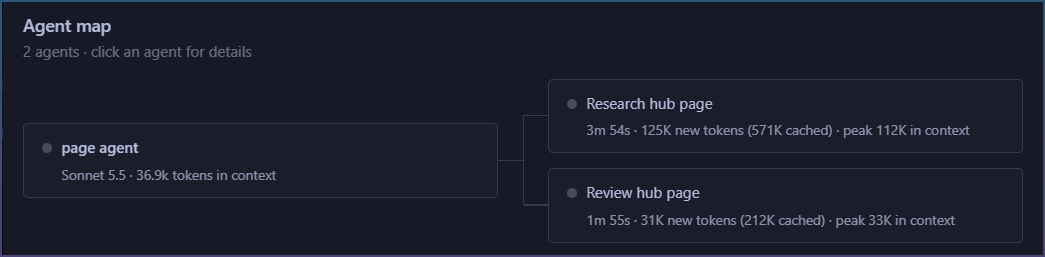
  • We then spawn extra agents after the content is written to do 2 things.
  1. Check article is written to be helpful
  2. Check facts are properly sourced and accurate

How it works

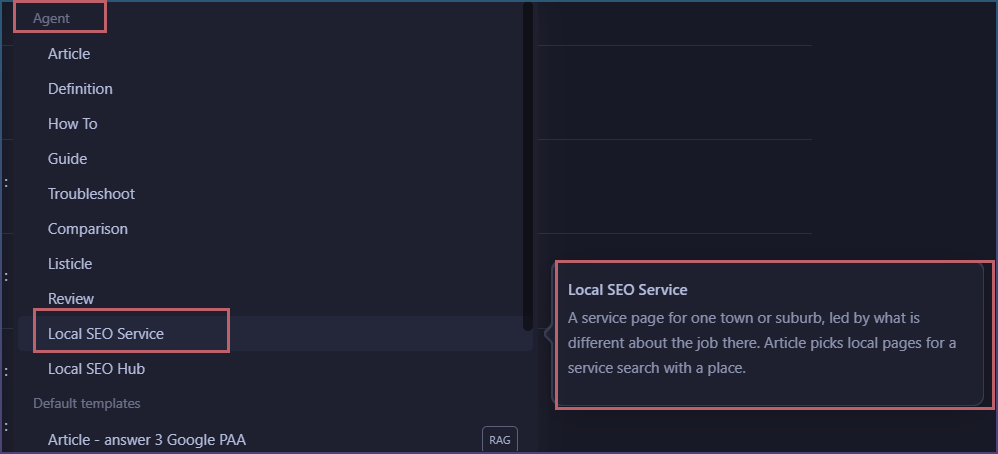
  • Page Pipeline, select the new page type from Agent list.
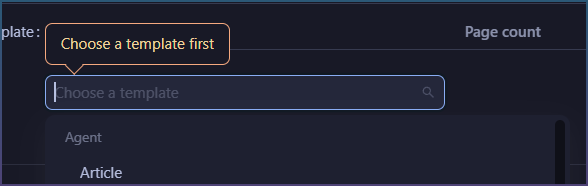
  • Pick Local SEO Service, Local SEO Hub, or Article to let the agent choose the page type.
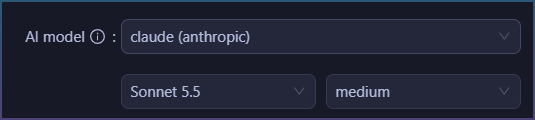
  • Use medium to high effort for the deepest research.
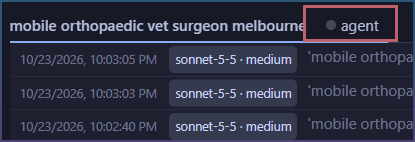
This is how typical article writing step looks like now.

I started with only 1 keyword “vet clinic, box hill, mel, aus” but Agent found very specific information to the location and started reading the council website @ whitehorse.

The old method in SCM and most likely any tool you use, would never have found and read the actual council website for real facts.

What this means going forward

  • Articles written with agent research, starting from Google to opening websites.
  • The model effort level decides on how much research and checking it will do.
  • More token cost
  • Agents have full access to tools, they can read pdfs, make searches and even compile stats if required because they have access to scripting and files

As models get better and their speed increases, this will be the new normal.

Right now a well researched run will burn through 200K new tokens, and make about 1Mil in token reads. So maybe 5x what a simple chain prompt will do. However the quality of articles jumps. It is also the future and presents what Agents are capable of now.

Next update to SCM ships with page agents.

All older chain prompts are now deprecated and no longer show up in the prompt selector.

Model selection will also be cut down slightly to only support services that work with agents and tool calls.
1 Like

Here is actual comparison of both types of articles as reviewed by AI.

I ran both the page agent version VS the previous chain template inside SCM.

This gives a good overview of how these 2 methods both are AI driven but lead to vastly different content


AI Chain Template Vs Page Agent

The Page Agent’s page is the one that passes Google’s Helpful Content (HCU) test. The AI Chain Template’s page reads like a generic explainer that never answers the search.

Page Agent

It took 5.5 minutes, used 112k tokens and produced 1,342 words.
Evidence from the log: the run starts with 1:00:49 AM | Processing page input and finishes with 1:06:24 AM | --- Finished. The log also shows Page agent usage: 112,065 new tokens and 'red alert 2 decomp' (1342 words)(68 lines).

The agent researched the topic itself.
Evidence from the log: it ran Search the web: red alert 2 decomp, then curl -sL ... https://raw.githubusercontent.com/sp00nznet/redalert2-recomp/main/README.md, then curl ... https://api.github.com/$r for RA2RE, Ritanlisa, xwxbug, vera20k and chronodivide. It also fetched https://phobos.readthedocs.io/....

The page names the real projects with versions, dates and licences.
Evidence from the page:

The repository xwxbug/RedAlert2 … based on version 1.006 (timestamp 2001-06-07) … GitHub shows its last update as May 2018. (line 15)

VERA20k rebuilds Yuri’s Revenge in Rust under the GPL-3.0 licence. (line 37)

It gives install steps with the build time and disk size.
Evidence from the page:

Press Build my recomp, then Play. (line 27)

The first build takes 30 to 60 minutes and about 6 GB (line 29)

It labels the maker’s numbers as the maker’s claims.
Evidence from the page:

These are the maker’s figures, not independent tests. Expect an alpha. (line 31)

It ends with a section that ties each goal to a real project.
Evidence from the page:

Want online multiplayer: Chrono Divide is the one with online play and a ladder. (line 50)

It leaves out CnCNet. The page never mentions CnCNet, although CnCNet ranked #4 in the AI Chain Template’s search results. The Page Agent’s own search results aren’t in its log.
Evidence from the AI Chain Template’s log: Parsing page (rank #4 https://cncnet.org/red-alert-2).

The recompilation section leans on the project’s own README.
Evidence from the page:

According to the project, it adds … (line 21)

The README reports 24,940 functions found (line 31)

AI Chain Template

It took 2.7 minutes and produced 2,802 words.
Evidence from the log: the run goes from 1:10:43 to 1:13:24 AM | --- Finished, and the log shows Template Topic Guide, Page 1 (2802 words).

It writes from search-result pages it scraped.
Evidence from the log: Page scraping done count: 14 and Found (223 lines) ... for 'red alert 2 decomp'. The template’s prompts begin Analyze extracted sentences from multiple sources.

It doesn’t name a single real decomp project.
Evidence from the page:

its completeness can only be confirmed by inspecting the repository yourself. (line 11)

This guide gives no progress figure because none can be verified here. (line 72)

Find community projects by searching GitHub for the project name along with the game title (line 57)

About a third of the page is general filler. About 50 of its 177 lines sit in the sections “How to Verify a Decomp Project’s Status” (lines 55-78) and “Why Early Reverse-Engineering Attempts Stall” (lines 80-88), plus the decompression detour.
Evidence from the page:

This section describes the general pattern of projects like this, not a dated record of one repository. (line 82)

Some people searching “decomp” mean decompression, such as extracting files from MIX archives. (line 23)

It says the resolution problem has no fix, which is out of date.
Evidence from the AI Chain Template’s page:

Resolution on modern displays remains limited, and the base game has no current fix. (line 130)

The Page Agent’s page says the opposite:

resolutions from 1280x720 to 3840x2160 (line 21)

The fix was also in the AI Chain Template’s own search results: Parsing page (rank #20 https://recompsoftware.com/game/command-conquer-red-alert-2-yuris-revenge/).

It treats OpenRA as an RA2 option.
Evidence from the AI Chain Template’s page:

Try OpenRA. It is a clean-room reimplementation, so it plays differently from RA2. (line 146)

The Page Agent checked OpenRA’s site:

its home page lists Red Alert, Command & Conquer and Dune 2000, not Red Alert 2. (line 39)

It lists odd Ares units. Nod is not a faction in Red Alert 2, so these names look like they came from another mod or game.
Evidence from the page:

secret Tech Lab units, such as the Nod Reckoner, Nod Redeemer, Mobile EM-Pulse, and Allied Guardian Tank. (line 106)

It does have real value in three places.
Evidence from the page:

RA2’s multiplayer relies on deterministic lockstep … the game reports a desync. (line 92)

CnCNet is the community multiplayer platform. (line 96)

EA released the source code of the FinalSun and FinalAlert 2 mission editors on GitHub under GPL v3. (line 29)

The editor claim has not been checked.

Why they differ

The Page Agent opened the sources itself, and its log shows the curl and GitHub API calls. The AI Chain Template could only rephrase the 223 sentences it scraped. None of those sentences named a decomp repo, so the template wrote around the gap. To improve the Page Agent’s page, the useful additions from the AI Chain Template’s page are CnCNet and the editor source release, once someone checks the editor claim.

Multi Sub-Agents are out now!

You can now load up your own skill files easily to use as article templates.

These are easier to write, no macros etc. Just in plain english telling the AI what to do.

Here is how.


Use your own skills in the chat and the page agent

A skill is a plain text file of instructions. You write it once, and then you can run it from the SEO Workspace chat or pick it as a page template in Page Pipeline.

1. Open your skills folder

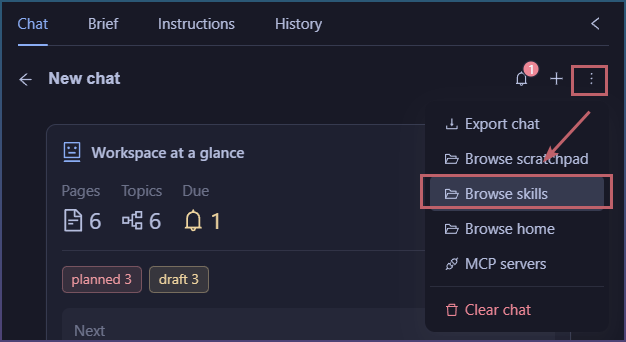
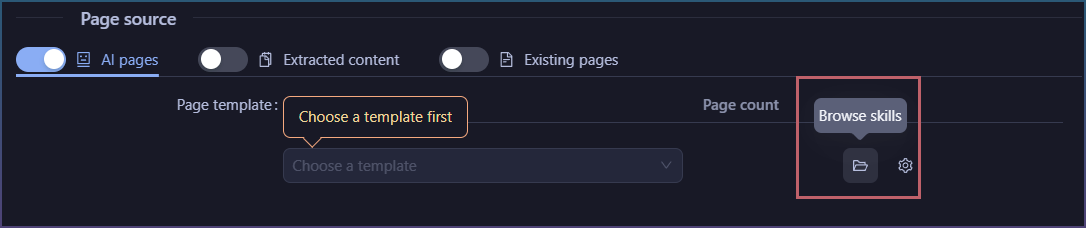
Click Browse skills. You’ll find it in the SEO Workspace chat menu, and next to the template list in Page Pipeline.

SEO workspace

Page pipeline

2. Make the skill

  1. In the skills folder, make a new folder. The folder name becomes the skill’s name, for example faq-page.

  2. In that folder, add a file called SKILL.md.

  3. Write your instructions in the file, the way you’d brief a writer.

The first line works as the skill’s description, so make it a one-sentence summary of what the skill does. For example: Write one question-and-answer page that answers the questions readers ask about a search.

You can also put a short header at the top of the file:

---
description: Write one question-and-answer page for a search.
output_extension: .html
---

The header is optional. output_extension can be .html (the default) or .txt.

3. Run it in the chat

In the SEO Workspace chat, type / and pick your skill. New skills show up straight away. Tick a page first, and the chat agent will follow your skill and write that page’s draft.

[Screenshot: the / menu showing the skill]

4. Use it as a page template

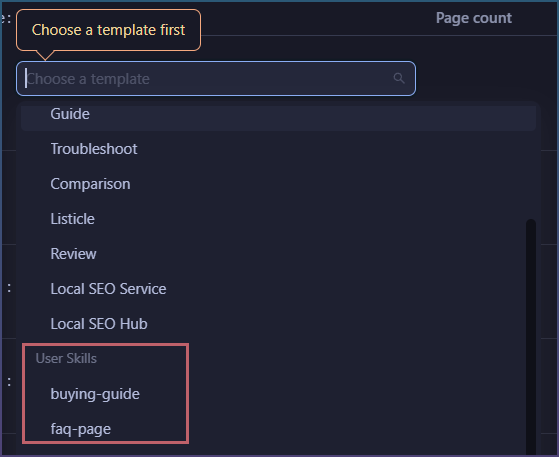
In Page Pipeline, go to Settings > AI pages > Page template and open the list. Your skills are listed under User Skills. The page agent runs your skill with the same research and review steps as the built-in templates.

To edit a skill later, click Locate skill on its row, and the folder opens with the file selected.

If a skill doesn’t show up

A skill that can’t be used appears greyed out with a warning icon. Hover over it to see why. The usual reasons are:

  • The file is empty.
  • The file type is something other than .html or .txt.
  • The name is already taken by a built-in template. Rename the folder to fix this.

The built-in skills can’t be changed, but you can add as many of your own as you like.