Exa.ai is a search API built for AI, called with a key instead of scraped. Free to start with $20 credit at signup, and SCM uses it anywhere you would pick Google or Bing.
Why use this?
- Free to start and free to keep using at low volume. $20 credit at signup, then $10 of credits every month with no card on file
- No proxies and no IP bans. It is an API call, so Google blocking scrapers stops being your problem
- Built for AI retrieval, not ads, so results lean to real content pages instead of shopping and listicles
- Up to 100 results per keyword in a single call, deeper than one scraped page
- Slots into the same search engine dropdown as Google, Bing and DuckDuckGo, so any existing task can switch to it with one setting
Notes
Exa is pay as you go and costs scale with your results setting.
- $20 in free credits at signup, then $10 of credits every month with no card on file
- A search costs $7 per 1,000 requests, which covers the first 10 results
- Results past the first 10 add $1 per 1,000 results
A 10 result search is about $0.007. A 100 result search is about $0.10.
Exa caps at 100 results per search, so setting SCM higher than that still returns 100.Your $10 monthly free credit is roughly 100 full searches, or around 1,400 small ones.
Set your result limit to what you actually need and the free tier goes a long way.
Where to get Exa.ai
Exa.ai:
How to connect Exa.ai
Settings > API Logins > Search > Exa.ai
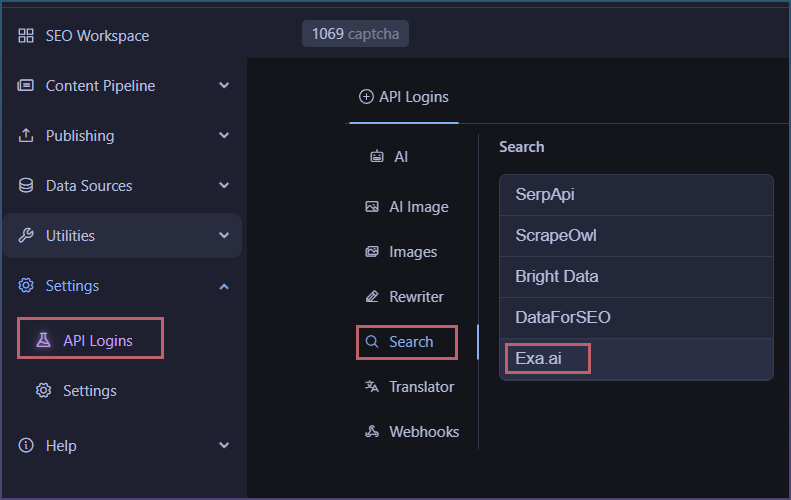
You will need an API key
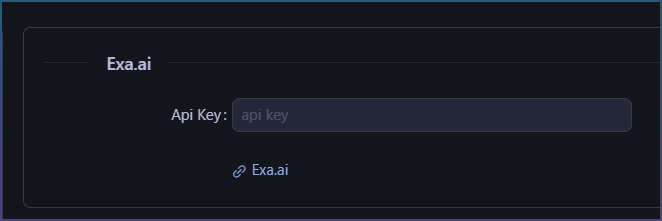
You can now use it where a search engine option appears.
How to select Exa.ai in Page pipeline
Under source, select Exa.ai

Where ever a source is available, Exa.ai will appear.